Wednesday, September 19, 2012

Module 5

Bubbl.us and Prezi have been useful tools within my classroom. They serve different purposes however they are a great way to present information using online tools. Considering that we as teachers are attempting to make that shift in 21st century learning this is a good start.

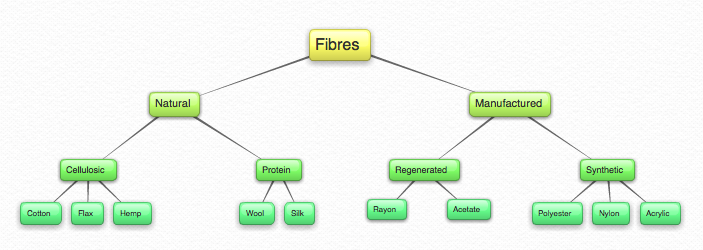
Bubbl.us allows teachers and students to electronically mind map concepts and ideas for any topic or subject. It can be used before a lesson as a resource, created during a lesson for activities or after a lesson to summarise main concepts and ideas. Before bubbl.us students would mind map concepts and ideas with misperceptions of space leaving the information to be illegible. This is another reason why bubbl.us is handy as there are no limits with space and all text is legible.

Here is an example of how I have used bubbl.us to teach Year 11 Textiles and Design about 'Fibres'.
Prezi is a great way to create online presentations for students or students can create presentations for assignments. It has certain features and functions that are interactive and exciting for students. The outcome is a personalised and unique presentation which is engaging. 

Here is a link to view a prezi that I have created for 'Food Packaging'

http://prezi.com/szq6_fwaofax/food-packaging/

Glogster is a new tool that I have been introduced to in module 5. It was interesting to discover that there is a way to create online posters and another way to create a webpage. The most intriguing function is the online poster tool. I encourage visual learning in the classroom and have used posters for learning using cardboard, text and images however, glogster is mess free and can be accessed online.


Thursday, September 6, 2012

Module 4


You think that you know a good handful of video sites that will be useful in the classroom such as Youtube however, it is amazing how many more there is out there; Vimeo, Teachers Tv, School Tube etc. This particular module has been a great discovery into the world of video sites. 

I am a true Youtube user in my classroom setting. I have used Youtube to present concepts, ideas and inspiration for my subject. It is a great way to cater for different learning styles in particular visual learners. Just recently as part of a Year 7 Technology unit the students were asked to produce a animoto  capturing images of their 3D bedroom model accompanied with images of their inspiration. The nature of the task was to make that connection with the inspiration and the final product and how they went through the design process. 

Can't wait to utilise the other video sites in my classroom!

Wednesday, August 29, 2012

Module 3

I have been introduced and used Google Docs in the classroom before exploring Module 3. Therefore I thoroughly enjoyed being interactive in this module. The first video titled "Google Docs in Plain English" is a quick and quirky way to explain what Google Docs is and how it operates.

It could be a way to teach our students!

I am excited to discover that this type of web 2.0 application is being used in the classroom. I must admit that although I am familiar with the application and have used it once, I have neglected it in my very own classroom. However after today Module 3 has inspired me to introduce Google Docs to my students. It not only shares information but it keeps the students updated with activities and assessments. I find myself having the same issue with students loosing assessment outlines and now I can use Google Docs to attach these worksheets and make modifications where necessary. Goodbye email attachments, hello Google Docs.

Other ways I can use Google Docs in my KLA (Textiles & Design/ Food Technology) include:
- conduct surveys for students to fill in as part of market research
- assign students to create powerpoint presentations collaboratively
- pre-test students through forms

I wonder how interactive the students will be?

Wednesday, August 22, 2012

Module 2

In my last year of my teaching degree I was introduced to twitter, an excellent way to connect with people and blog reflections, relevant resources and even ask questions. I did not understand the relevance at the time however after Module 2 I have greater understanding and insight into the usefulness of blogging and how it could potentially occur within a classroom setting to allow students to ask questions, engage themselves in the subject and as a result develop their learning. As a department we have created an edmodo account with Year 7 Technology (Mandatory) for their bedroom design unit.

Module 1

Hello my name is Danielle Russo and I am currently teaching at Bethlehem College Ashfield. I teach Technology (Mandatory), Food Technology and Textiles & Design. I enjoy playing sport particularly touch football. I play in a mixed team for summer and winter competitions. My passion in life is fashion design and teaching it to my students is very rewarding. I found Module 1 interesting and engaging as it encourages current teachers to interact with Web 2.0 tools in the classroom. This will definitely be useful for myself and the TAS department.